
Does a 15.6 Inch 100% sRGB Portable Monitor Work Well with MacBook and Windows Laptops
2026-10-09
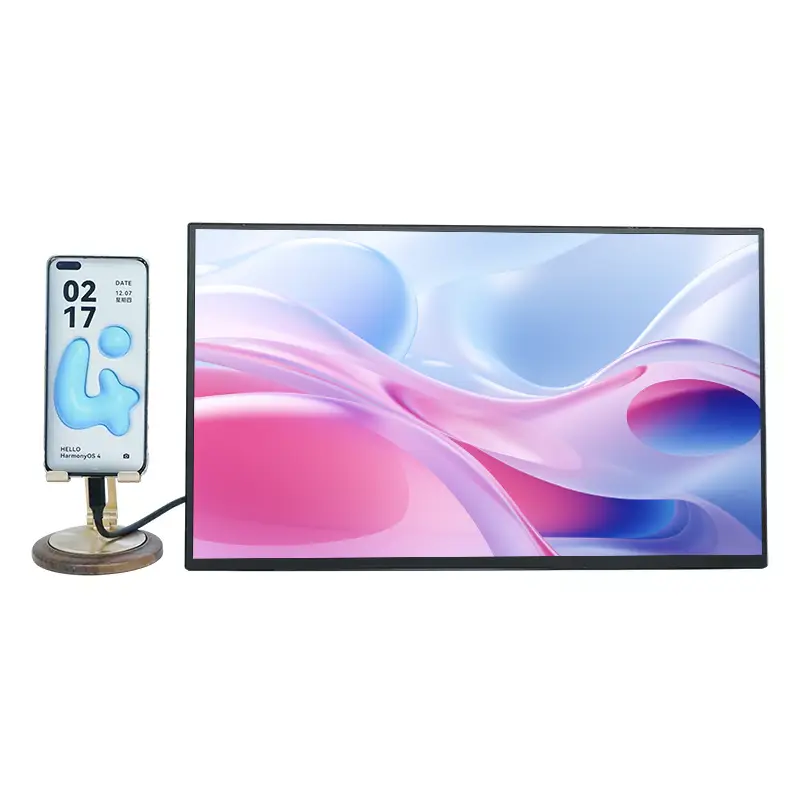
Connecting a second screen to a laptop is one of the fastest ways to boost productivity, and the 15.6 Inch 100% sRGB Portable Monitor from CHANGXIAN has become a popular choice for users who need accurate color and true plug-and-play convenience. Whether you work on a MacBook, a Windows ultrabook, or a gaming laptop, compatibility is the first question worth answering. This guide explains how the CHANGXIAN 15.6 Inch 100% sRGB Portable Monitor performs across both operating systems, what ports and settings matter, and where it genuinely shines.
Why Compatibility Matters More Than Ever
Modern laptops have fewer ports and stricter power delivery rules. A portable monitor must negotiate video signal, power, and resolution without drivers or complicated setup. The CHANGXIAN 15.6 Inch 100% sRGB Portable Monitor is built around USB-C with DisplayPort Alt Mode, which is the same standard used by current MacBook and Windows machines.
Key Compatibility Factors
-
USB-C with DP Alt Mode – single-cable video and power
-
Mini HDMI – fallback for older or HDMI-only laptops
-
Power Delivery support – stable brightness without draining the host
-
Plug-and-play drivers – no installation required on macOS or Windows
-
Color profile handling – 100% sRGB coverage recognized by both systems
MacBook Compatibility
MacBooks are strict about USB-C protocols, but the 15.6 Inch 100% sRGB Portable Monitor works reliably when the port supports DisplayPort Alt Mode.
| MacBook Model | Connection | Result |
|---|---|---|
| MacBook Air M1/M2/M3 | USB-C to USB-C | Video + power, no driver |
| MacBook Pro 13"–16" | USB-C to USB-C | Full resolution, 60Hz |
| Older MacBook with HDMI | Mini HDMI to HDMI | Video only, separate power |
| MacBook with single USB-C port | USB-C hub | Stable if hub supports DP Alt Mode |
On macOS, the display is detected automatically. Users can set it as an extended desktop or mirrored screen in System Settings > Displays. Because the panel covers 100% sRGB, photo and video work looks consistent with the MacBook's own Retina display.
Windows Laptop Compatibility
Windows laptops are generally more flexible, and the CHANGXIAN 15.6 Inch 100% sRGB Portable Monitor connects through USB-C, Mini HDMI, or a combination of both.
| Windows Laptop Type | Connection | Result |
|---|---|---|
| USB-C with DP Alt Mode | USB-C to USB-C | Video + power, instant detection |
| HDMI-only laptop | Mini HDMI to HDMI | Video works, USB power required |
| Thunderbolt 3/4 | USB-C to USB-C | Full resolution, fast data |
| Older USB-A only | USB-A to HDMI adapter | Video only, separate power |
Windows 10 and Windows 11 recognize the monitor as a generic display. Users can extend, duplicate, or use it as the only screen through Display Settings. Touch, brightness, and color are managed through the monitor's OSD buttons.
Performance Comparison
| Feature | MacBook | Windows Laptop |
|---|---|---|
| Plug-and-play | Yes | Yes |
| Single-cable setup | Yes (USB-C) | Yes (USB-C) |
| Color accuracy | Excellent | Excellent |
| Driver required | No | No |
| Brightness control | OSD buttons | OSD buttons |
| Daisy chaining | Limited | Model dependent |
FAQ
Q: Does the 15.6 Inch 100% sRGB Portable Monitor work with a MacBook Air M1 without a driver?
A: Yes, it works without any driver. Connect the monitor to the MacBook Air M1 using a USB-C to USB-C cable that supports DisplayPort Alt Mode, and macOS will detect it automatically as an extended display. If the MacBook only has one USB-C port, use a powered USB-C hub so the monitor receives enough power while the laptop charges.
Q: Can a 15.6 Inch 100% sRGB Portable Monitor run on a Windows laptop that only has HDMI?
A: Yes, it can run through the Mini HDMI port. Connect the laptop's HDMI output to the monitor's Mini HDMI input, then power the monitor separately through its USB-C power port. Video will display normally, but the single cable convenience of USB-C will not be available, and brightness may be limited depending on the power source.
Q: Is the 15.6 Inch 100% sRGB Portable Monitor good for color-accurate work on both systems?
A: Yes, the 100% sRGB coverage makes it suitable for photo editing, graphic design, and video color correction on both macOS and Windows. Colors remain consistent because the panel covers the full sRGB gamut, and neither operating system requires special calibration software to recognize the display. For best results, disable any automatic color management that conflicts with the monitor's native profile.
Final Thoughts
The CHANGXIAN 15.6 Inch 100% sRGB Portable Monitor is a dependable second screen for MacBook and Windows users alike. USB-C with DisplayPort Alt Mode delivers the cleanest experience, while Mini HDMI keeps older laptops in the loop. For anyone who needs accurate color, lightweight portability, and instant setup, this monitor is a practical upgrade.
Ready to expand your workspace with a CHANGXIAN 15.6 Inch 100% sRGB Portable Monitor? Contact us today for pricing, bulk orders, and technical support tailored to your laptop setup.