

How to Integrate a 2.1 Inch Circular Touch Display Solution into Your Product Design
2026-11-04
Bringing a compact, round interface to life requires more than selecting a panel from a catalog. A 2.1 Inch Circular Touch Display Solution combines a circular TFT panel, a capacitive touch layer, and a controller that must work in harmony with your enclosure, firmware, and power budget. At SKY-TDM, we have supported product teams across wearables, medical devices, and industrial controls through hundreds of circular display integrations. This guide distills the practical steps that separate a smooth ramp to production from a costly redesign cycle.
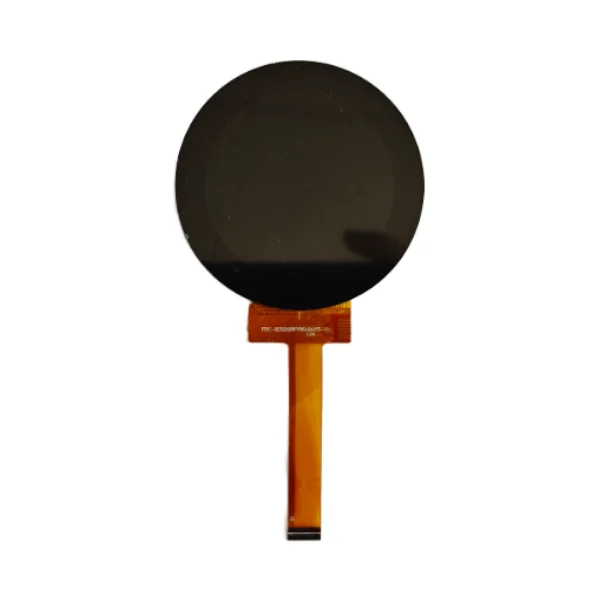
1. Define the Mechanical Interface Before the Electrical One
The circular form factor leaves little tolerance for error. Begin with the bezel geometry, viewing window diameter, and FPC exit direction, then confirm them against the panel drawing. A 2.1 Inch Circular Touch Display Solution from SKY-TDM ships with a dimensional drawing that includes active area, outline, and connector placement, so your mechanical team can model the stack-up immediately.
| Design Parameter | Typical Specification | Design Consideration |
|---|---|---|
| Active area diameter | 53.2 mm (approx.) | Match to bezel opening with 0.3–0.5 mm clearance |
| Outline diameter | 56–58 mm | Account for adhesive and gasket thickness |
| Touch type | Projected capacitive (PCAP) | Supports multi-touch and glove modes |
| Interface | MIPI DSI / SPI / RGB | Choose based on host MCU/SoC capability |
| FPC exit | Bottom or side | Confirm bend radius inside enclosure |
2. Match the Host Interface to Your Processing Budget
Not every MCU can drive a 2.1 Inch Circular Touch Display Solution at full refresh rate. SPI is simple but limits bandwidth; MIPI DSI suits higher-resolution animation; RGB offers a balance for cost-sensitive designs. SKY-TDM provides controller options with onboard touch ICs, reducing host-side pin count and firmware complexity.
3. Validate Touch Performance in the Real Enclosure
Touch tuning must happen after the cover lens and gasket are installed. Moisture, adhesive thickness, and grounding all shift capacitive baseline values. Request a 2.1 Inch Circular Touch Display Solution evaluation kit from SKY-TDM and run your own cover-lens stack-up before committing to tooling.
4. Plan Power and Thermal Behavior Early
Circular displays often sit in battery-powered products. Measure average and peak current with your actual content, then confirm backlight driver efficiency. SKY-TDM can supply panels with adjustable brightness levels and low-power sleep modes that extend runtime without compromising readability.
5. Lock Down Production Consistency
Ask for PPAP documentation, optical inspection reports, and lot traceability. A reliable 2.1 Inch Circular Touch Display Solution supplier should provide consistent color binning and touch sensitivity across batches. SKY-TDM maintains incoming inspection records for every shipment.
Frequently Asked Questions
Q: Can a 2.1 Inch Circular Touch Display Solution support multi-touch gestures?
A: Yes. Projected capacitive versions handle two-point and five-point gestures, and SKY-TDM controllers can be configured for swipe, pinch, and long-press detection through standard I2C reporting.
Q: What cover lens materials work best with a 2.1 Inch Circular Touch Display Solution?
A: Chemically strengthened glass at 0.7–1.1 mm and optical-grade PMMA both perform well; glass offers better scratch resistance while PMMA reduces weight, and SKY-TDM provides touch tuning guidance for either stack-up.
Q: How long does it take to receive samples of a 2.1 Inch Circular Touch Display Solution?
A: Standard samples from SKY-TDM ship within 3–5 business days, while customized FPC length, brightness, or cover-lens bonding typically requires 2–3 weeks depending on tooling status.
Contact Us
Ready to move from concept to production? Contact SKY-TDM today to request a 2.1 Inch Circular Touch Display Solution datasheet, evaluation kit, or a design review with our engineering team. Share your enclosure drawings and interface requirements, and we will respond with a tailored recommendation within one business day.